Training
This guide covers how to train the Spectrum Analyzer model on your dataset.
Repository: GitHub
Pre-trained Models: Google Drive
Training Overview
Training involves:
- Preparing your dataset
- Configuring dataset and model files
- Setting hyperparameters
- Running the training script
- Monitoring training progress
Dataset Preparation
Dataset Structure
Your dataset should follow this structure:
dataset/
├── images/
│   ├── train/      # Training images
│   ├── val/        # Validation images
│   └── test/       # Test images
└── labels/
    ├── train/      # Training annotations (YOLO format)
    ├── val/        # Validation annotations
    └── test/       # Test annotations
Annotation Format
Annotations should be in YOLO format:
- One
.txtfile per image - Format:
class_id x_center y_center width height(normalized 0-1) - Example:
0 0.5 0.5 0.3 0.4
Dataset Configuration File
Create a YAML file in data/ directory:
# data/your_dataset.yaml
path: /path/to/your/dataset
train: images/train
val: images/val
test: images/test
nc: 11  # number of classes
names: ['class1', 'class2', ...]  # class names
Basic Training
Minimal Training Command
python train.py \
    --data data/your_dataset.yaml \
    --cfg models/resnet18.yaml \
    --imgsz 512 \
    --epochs 300 \
    --batch-size 64 \
    --device 0
Training Parameters Explained
Required Parameters:
--data: Path to dataset YAML file--cfg: Path to model configuration file--imgsz: Image size (must be divisible by 32)
Common Parameters:
--epochs: Number of training epochs (default: 300)--batch-size: Batch size (default: 16)--device: GPU device(s) or 'cpu'--workers: Number of data loading workers (default: 4)
Advanced Training Options
Resume Training
Resume from a checkpoint:
python train.py \
    --resume runs/train/exp28/weights/last.pt \
    --data data/raddet.yaml \
    --cfg models/resnet18.yaml \
    --epochs 300
Multi-GPU Training
Train on multiple GPUs:
python train.py \
    --data data/raddet.yaml \
    --cfg models/resnet18.yaml \
    --device 0,1,2,3 \
    --batch-size 64
Image Caching
Cache images in RAM for faster training:
python train.py \
    --data data/raddet.yaml \
    --cfg models/resnet18.yaml \
    --cache ram
Freeze Backbone
Freeze backbone layers for transfer learning:
python train.py \
    --data data/raddet.yaml \
    --cfg models/resnet18.yaml \
    --freeze 10  # Freeze first 10 layers
Custom Hyperparameters
Use custom hyperparameters file:
python train.py \
    --data data/raddet.yaml \
    --cfg models/resnet18.yaml \
    --hyp data/hyps/custom_hyperparameters.yaml
Periodic Checkpoint Saving
Save checkpoints every N epochs:
python train.py \
    --data data/raddet.yaml \
    --cfg models/resnet18.yaml \
    --save-period 10  # Save every 10 epochs
Training Process
Training Stages
- Initialization: Load model, dataset, hyperparameters
- Epoch Loop: For each epoch:
- Training phase: Forward pass, loss computation, backpropagation
- Validation phase: Evaluate on validation set
- Save checkpoints: Save best and last models
- Post-training: Generate plots and metrics
Training Output
Training creates a directory structure:
runs/train/exp28/
├── weights/
│   ├── best.pt      # Best model (highest mAP)
│   ├── last.pt      # Last epoch model
│   └── epoch*.pt    # Periodic checkpoints
├── results.png      # Training curves
├── PR_curve.png     # Precision-Recall curve
├── P_curve.png      # Precision-Confidence curve
├── R_curve.png      # Recall-Confidence curve
├── confusion_matrix.png
├── hyp.yaml         # Hyperparameters used
└── opt.yaml         # Training options used
Monitoring Training
Training Metrics:
- Box loss: Bounding box regression loss
- Object loss: Objectness prediction loss
- Classification loss: Class prediction loss
- Precision: Detection precision
- Recall: Detection recall
- mAP@0.5: Mean Average Precision at IoU 0.5
- mAP@0.5:0.95: Mean Average Precision at IoU 0.5-0.95
Training Curves:
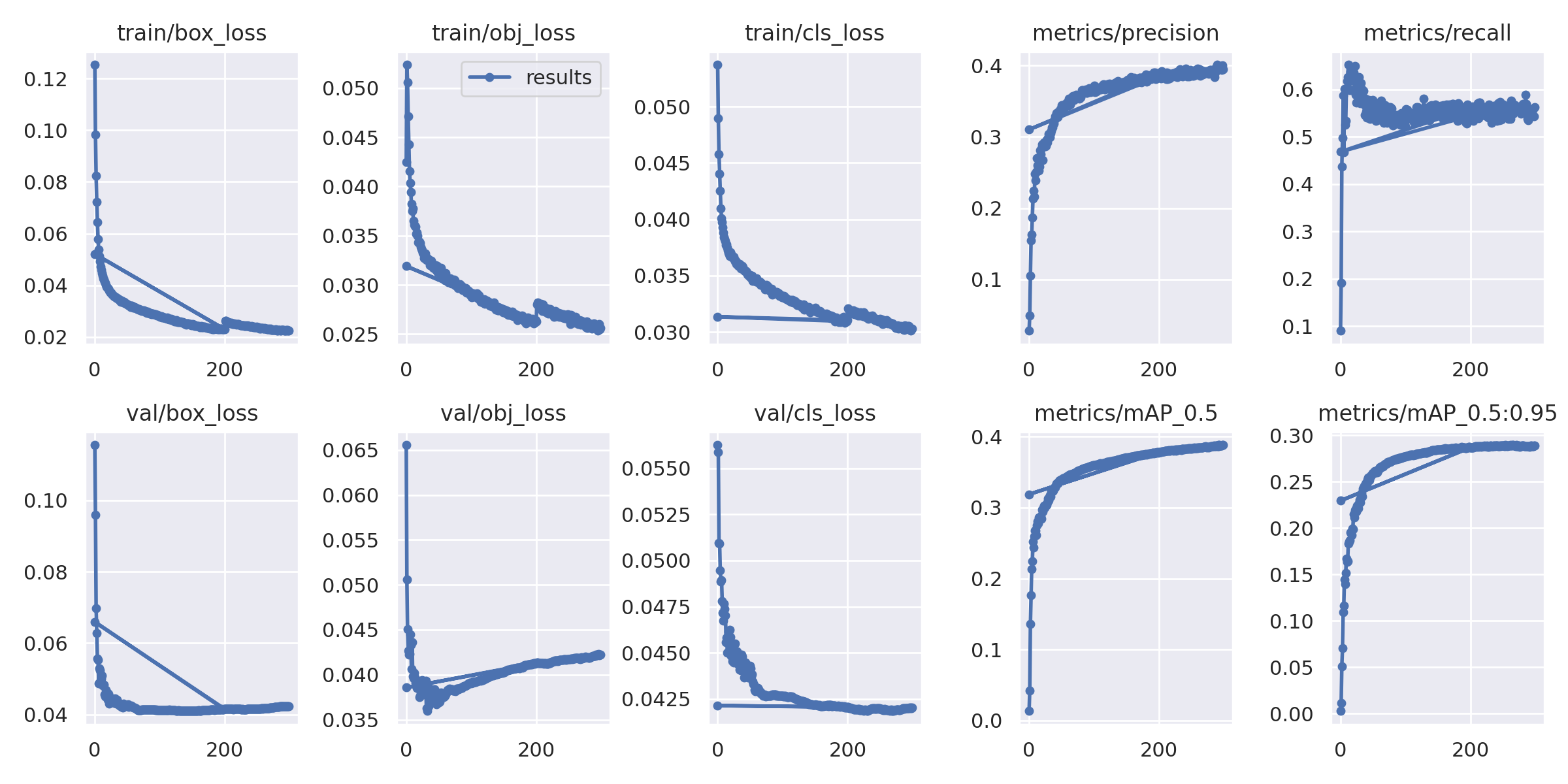
The training curves show:
- Loss convergence over epochs
- Metric improvement (precision, recall, mAP)
- Training vs validation performance
Hyperparameter Tuning
Learning Rate
Adjust in data/hyps/hyp.scratch.yaml:
lr0: 0.01  # Initial learning rate
lrf: 0.1   # Final learning rate (lr0 * lrf)
Loss Weights
Balance different loss components:
box: 0.05  # Box loss weight
cls: 0.5   # Classification loss weight
obj: 1.0   # Objectness loss weight
Data Augmentation
Configure augmentation in hyperparameters:
hsv_h: 0.015  # Hue augmentation
hsv_s: 0.7    # Saturation augmentation
hsv_v: 0.4    # Value augmentation
fliplr: 0.5   # Horizontal flip probability
mosaic: 1.0   # Mosaic augmentation probability
Best Practices
Image Size Selection
- 512×512: Good balance for most cases (RadDet default)
- 640×640: Higher accuracy, slower training
- 320×320: Faster training, lower accuracy
Batch Size
- Larger batch size: More stable training, requires more GPU memory
- Smaller batch size: Less memory, may need to adjust learning rate
- Recommended: 32-64 for 512×512 images
Number of Epochs
- Start with 300 epochs
- Monitor validation metrics
- Use early stopping if metrics plateau
- Resume training if needed
Learning Rate Schedule
- Default: OneCycleLR with warmup
- Warmup epochs: 3
- Final LR: 10% of initial LR
Model Selection
- ResNet-18: Good balance (default)
- ResNet-10: Faster, less accurate
- ResNet-34: More accurate, slower
Troubleshooting
Out of Memory
- Reduce batch size
- Reduce image size
- Use gradient accumulation
- Use mixed precision training
Poor Convergence
- Check learning rate (may be too high/low)
- Verify dataset annotations
- Check data augmentation
- Try different model architecture
Overfitting
- Increase data augmentation
- Add regularization (weight decay)
- Reduce model capacity
- Use more training data
Example: Full Training Command
Complete training example with all options:
python train.py \
    --data data/raddet.yaml \
    --cfg models/resnet18.yaml \
    --hyp data/hyps/hyp.scratch.yaml \
    --epochs 300 \
    --batch-size 64 \
    --imgsz 512 \
    --device 0 \
    --workers 20 \
    --cache ram \
    --project runs/train \
    --name exp28 \
    --save-period 10
This will:
- Train for 300 epochs
- Use batch size of 64
- Process 512×512 images
- Use GPU 0
- Cache images in RAM
- Save checkpoints every 10 epochs
Post-Training: Model Conversion
After training, you may want to convert the model from SiLU activations to binary spiking activations for deployment on neuromorphic hardware:
python convert_to_binary_spiking.py \
    --weights runs/train/exp28/weights/best.pt \
    --output arch/model_binary.pt \
    --data data/raddet.yaml \
    --img-size 512
For detailed information about model conversion, see the Model Conversion Guide.
Related Documentation
- Architecture: Model architecture details
- Configuration: All configuration options
- Detection: Running inference with trained models
- Model Conversion: Converting models for deployment
- Quantization: Optimizing models for deployment
- RadDet Use Case: Training example with RadDet dataset